

 
|

|
Modifying the Approver List
To change the approver list for an expense report with an Ad Hoc Approver workflow:
-
Open the expense report where you want to modify the approver list.
-
Click Approver List. The Approver List box appears.
-
Type the name of the ad-hoc approver that you want to add to the list in the approval workflow in the Approver field, and then select the name from the drop-down list.
-
Click Add Ad-Hoc Approver to add the approver to the list of approvers. The additional approver is added to the list.
-
The workflow moves from top to bottom in the approver list.
-
To adjust the approver order, click a name in the Approver list and drag it to the desired position.

-
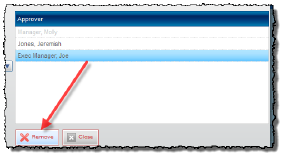
To remove an approver from the list, select the name in the Approver list, and then click Remove.
-
-
Click Close when you are finished modifying approvers.